
Categories
Admission

Documents for NMIMS Distance Learning Admission

Table of Contents

Please check the post below for complete list of documentation and things to note.

1

Important Notice

2

Things to Note

  • Compulsory Photo ID Proof (Colour Photo Copy of Aadhar Card – Front and Back)
  • Another Photo ID Proof (Colour Photo Copy of PAN card / Passport / Driving License / Election Card)
  • Picture of Color Passport Photograph which matches with the photo printed in any of your KYC Documents
  • Just click the picture from your Mobile Camera from a close range with FLASH OFF
  • Keep the camera exactly above the Document while clicking the picture
  • This applies only for Passport Photograph and KYC Document
  • SSC Mark Sheet / Certificate
  • HSC Mark Sheet / Certificate
  • Degree Mark Sheets (All Semesters)
  • Degree Certificate
  • 2 years Work Experience Certificate [If the score at Graduation level is less than 50%]
  • Marriage Certificate / Affidavit [In the case of Name Change]
  • Compulsory Photo ID Proof (Colour Photo Copy of Aadhar Card – Front and Back)
  • Another Photo ID Proof (Colour Photo Copy of PAN card / Passport / Driving License / Election Card)
  • Picture of Color Passport Photograph which matches with the photo printed in any of your KYC Documents
  • Just click the picture from your Mobile Camera from a close range with FLASH OFF
  • Keep the camera exactly above the Document while clicking the picture
  • This applies only for Passport Photograph and KYC Document
  • SSC Mark Sheet / Certificate
  • HSC Mark Sheet / Certificate
  • Degree Mark Sheets (All Semesters)
  • Degree Certificate [Score at Graduation should be more than 50%]
  • 2 years Work Experience Certificate
  • Marriage Certificate / Affidavit [In the case of Name Change]
  • Compulsory Photo ID Proof (Colour Photo Copy of Aadhar Card – Front and Back)
  • Another Photo ID Proof (Colour Photo Copy of PAN card / Passport / Driving License / Election Card)
  • Picture of Color Passport Photograph which matches with the photo printed in any of your KYC Documents
  • Just click the picture from your Mobile Camera from a close range with FLASH OFF
  • Keep the camera exactly above the Document while clicking the picture
  • This applies only for Passport Photograph and KYC Document
  • SSC Mark Sheet / Certificate
  • HSC Mark Sheet / Certificate
  • Diploma Mark Sheet (All Semesters) [If the criteria selected is Diploma plus 2 years of Work Experience]
  • Diploma Certificate [If the criteria selected is Diploma plus 2 years of Work Experience]
  • 2 years Work Experience Certificate [If the criteria selected is HSC or Diploma plus 2 years of Work Experience]
  • Degree Mark Sheets (All Semesters) [If the criteria selected is Graduation]
  • Degree Certificate [If the criteria selected is Graduation]
  • Marriage Certificate / Affidavit [In the case of Name Change]
  • Compulsory Photo ID Proof (Colour Photo Copy of Aadhar Card – Front and Back)
  • Another Photo ID Proof (Colour Photo Copy of PAN card / Passport / Driving License / Election Card)
  • Picture of Color Passport Photograph which matches with the photo printed in any of your KYC Documents
  • Just click the picture from your Mobile Camera from a close range with FLASH OFF
  • Keep the camera exactly above the Document while clicking the picture
  • This applies only for Passport Photograph and KYC Document
  • SSC Mark Sheet / Certificate
  • HSC Mark Sheet / Certificate
  • Diploma Mark Sheet (All Semesters) [If the criteria selected is Diploma plus 2 years of Work Experience]
  • Diploma Certificate [If the criteria selected is Diploma plus 2 years of Work Experience]
  • 2 years Work Experience Certificate [If the criteria selected is HSC or Diploma plus 2 years of Work Experience]
  • Marriage Certificate / Affidavit [In the case of Name Change]
  • Compulsory Photo ID Proof (Colour Photo Copy of Aadhar Card – Front and Back)
  • Another Photo ID Proof (Colour Photo Copy of PAN card / Passport / Driving License / Election Card)
  • Picture of Color Passport Photograph which matches with the photo printed in any of your KYC Documents
  • Just click the picture from your Mobile Camera from a close range with FLASH OFF
  • Keep the camera exactly above the Document while clicking the picture
  • This applies only for Passport Photograph and KYC Document
  • SSC Mark Sheet / Certificate
  • HSC Mark Sheet / Certificate
  • 2 years Work Experience Certificate [If the criteria selected is SSC plus 2 years of Work Experience]
  • Marriage Certificate / Affidavit [In the case of Name Change]
Search

3

Take special care of the following things before submission of documents:

4

Points to note after submission of documents and Fee payment:

Refer a Friend

Refer a Friend and earn Rewards. Call us or fill the form at www.halo.co.in/refer to refer your Friends and Colleagues.

Call Us

8080 500 400

WhatsApp Us

8080 500 400

Disclaimer

The content included in this Website has been compiled from emails and communications from NMIMS Distance Learning and NMIMS Global Access School of Continuing Education website. It is subject to change without notice. The rules, policies and announcements are to be checked from NMIMS University – NMIMS Distance Learning (NGASCE) which will be final and binding. We will not be liable for any damages, including any consequential damages, of any kind that may result to the user from the use of the Website, or of any of information and/or services described herein.

You can also visit our NMIMS Distance Learning Centres at Thane, Malad – Mumbai to obtain more information about your Narsee Monjee Distance Education Programs which include NMIMS Distance MBA, Post Graduation (PG), Diploma, Bachelor Degree, MBA, BBA, BCOM or Certificate Courses in Supply Chain Management, Marketing Management, International Trade, Management, Human Resource Management, Financial Management, Business Management, Banking & Finance Management, Retail Management, Information Technology & Systems Management, General Management, Corporate Communication, Business Management, Digital Marketing, IT Management, Operations Management, Project Management and Wealth Management.


Categories
Alerts

Join Us On WhatsApp

Table of Contents

1

JOIN US ON WHATSAPP

We have launched WhatsApp Support for all our Students starting from today.

You will be updated on all the latest announcements via WhatsApp and you can post your queries or questions on it to get a quick resolution.

2

Join our WhatsApp Broadcasting Service

Join our WhatsApp Broadcasting Service by sending a “Hi” to our WhatsApp number 8080500400.
Search

Refer a Friend

Refer a Friend and earn Rewards. Call us or fill the form at www.halo.co.in/refer to refer your Friends and Colleagues.

Call Us

8080 500 400

WhatsApp Us

8080 500 400

Disclaimer

The Content Included In This Website Has Been Compiled From Emails And Communications From NMIMS Distance Learning And NMIMS Global Access School Of Continuing Education Website. It Is Subject To Change Without Notice. The Rules, Policies, and Announcements Are To Be Checked From NMIMS Global (NGASCE) Which Will Be Final And Binding. We Will Not Be Liable For Any Damages, Including Any Consequential Damages, Of Any Kind That May Result To The User From The Use Of The Website, Or Of Any Of Information And/Or Services Described Herein.

Categories
Admission Alerts Alumni Assignments Course Acadmic Documents Examinations Explainer Hall Ticket Jobs Lectures Next Sem Registration Projects Results Videos

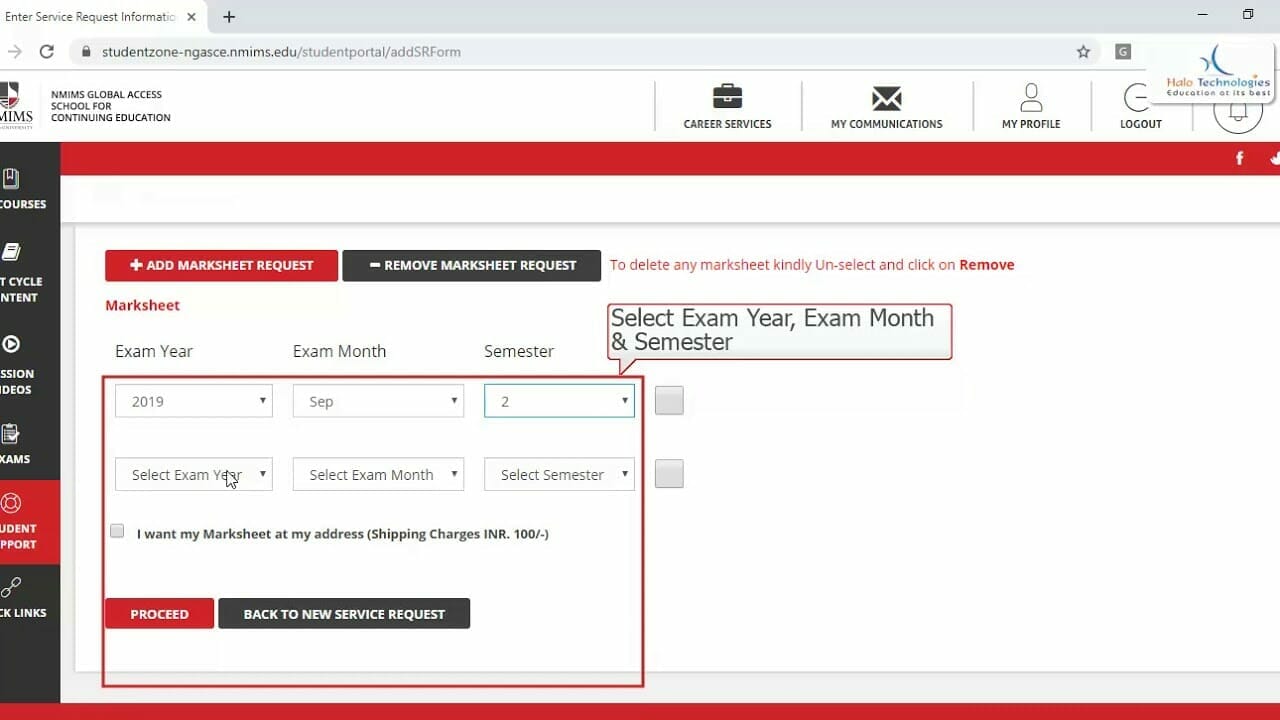
Issue of Mark Sheet / Final Certificate

Table of Contents

Process to be followed by eligible candidates for obtaining Hard Copy of Mark Sheets/Final Certificate for Diploma, Post Graduate Diploma and Certificate Programs

1

Important Notice

2

Important Points to Note

Search

3

Explainer Videos

Steps to Download Soft Copy of Mark Sheets
Steps to Apply for Hard Copy of Mark Sheet or Certificate

Refer a Friend

Refer a Friend and earn Rewards. Call us or fill the form at www.halo.co.in/refer to refer your Friends and Colleagues.

Call Us

8080 500 400

WhatsApp Us

8080 500 400

Disclaimer

The Content Included In This Website Has Been Compiled From Emails And Communications From NMIMS Distance Learning And NMIMS Global Access School Of Continuing Education Website. It Is Subject To Change Without Notice. The Rules, Policies, and Announcements Are To Be Checked From NMIMS Global (NGASCE) Which Will Be Final And Binding. We Will Not Be Liable For Any Damages, Including Any Consequential Damages, Of Any Kind That May Result To The User From The Use Of The Website, Or Of Any Of Information And/Or Services Described Herein.

Categories
Alerts

Join Alma Connect

Table of Contents

Visit https://distance-nmims.almaconnect.com and connect with your LinkedIn or Facebook profile.You can also sign with your Email for the same.

1

Join Alma Connect

2

Some of the features of Alma Connect platform:

Search

3

Expectations from the Members of Alma Connect:

4

This forum is strictly for professional learning and networking, hence the members must avoid posting:

Please mention your Student Number (SAP ID) in all communication.

Refer a Friend

Refer a Friend and earn Rewards. Call us or fill the form at www.halo.co.in/refer to refer your Friends and Colleagues.

Call Us

8080 500 400

WhatsApp Us

8080 500 400

Disclaimer

The Content Included In This Website Has Been Compiled From Emails And Communications From NMIMS Distance Learning And NMIMS Global Access School Of Continuing Education Website. It Is Subject To Change Without Notice. The Rules, Policies, and Announcements Are To Be Checked From NMIMS Global (NGASCE) Which Will Be Final And Binding. We Will Not Be Liable For Any Damages, Including Any Consequential Damages, Of Any Kind That May Result To The User From The Use Of The Website, Or Of Any Of Information And/Or Services Described Herein.

You can also visit our NMIMS Distance Learning Centres at Thane, Malad – Mumbai, Dharampeth – Nagpur or Madhapur – Hyderabad to obtain more information about your Narsee Monjee Distance Education Programs which include Post Graduation (PG), Diploma or Certificate Courses in Supply Chain Management, Marketing Management, International Trade, Management, Human Resource Management, Financial Management, Business Management, Banking & Finance Management, Retail Management, Information Technology & Systems Management, General Management, Corporate Communication, Business Management, Digital Marketing, IT Management, Operations Management, Project Management and Wealth Management.
Categories
Alerts

Steps to Watch or Download Recorded Lectures or e-Books

Table of Contents

NMIMS Recorded Lectures, e-Books (Course Material), Case Studies and PowerPoint Slides (Course Presentation) related to your Course at NMIMS Distance Learning can be obtained by following the steps below:

1

Steps to watch or download NMIMS Recorded Lectures:

These are the steps for NMIMS Recorded Lectures. To watch NMIMS Lectures live from your PC or Mobile, please visit https://najeebullahwp.com/nmims-distance-lectures/ to know the schedule and steps.

Search

2

Other ways to watch or download recorded lectures:

OR

To download the NMIMS Recorded Lectures, right click on Download, choose Save As option to download it

You can also download NMIMS Distance Education App from Google or Apple Store

Refer a Friend

Refer a Friend and earn Rewards. Call us or fill the form at www.halo.co.in/refer to refer your Friends and Colleagues.

Call Us

8080 500 400

WhatsApp Us

8080 500 400

Disclaimer

The Content Included In This Website Has Been Compiled From Emails And Communications From NMIMS Distance Learning And NMIMS Global Access School Of Continuing Education Website. It Is Subject To Change Without Notice. The Rules, Policies, and Announcements Are To Be Checked From NMIMS Global (NGASCE) Which Will Be Final And Binding. We Will Not Be Liable For Any Damages, Including Any Consequential Damages, Of Any Kind That May Result To The User From The Use Of The Website, Or Of Any Of Information And/Or Services Described Herein.

You can also visit our NMIMS Distance Learning Centres at Thane, Malad – Mumbai, Dharampeth – Nagpur or Madhapur – Hyderabad to obtain more information about your Narsee Monjee Distance Education Programs which include Post Graduation (PG), Diploma or Certificate Courses in Supply Chain Management, Marketing Management, International Trade, Management, Human Resource Management, Financial Management, Business Management, Banking & Finance Management, Retail Management, Information Technology & Systems Management, General Management, Corporate Communication, Business Management, Digital Marketing, IT Management, Operations Management, Project Management and Wealth Management.

Categories
Alerts

NMIMS Student Zone – 4 Easy Steps To Login To NMIMS Portal

Table of Contents

1

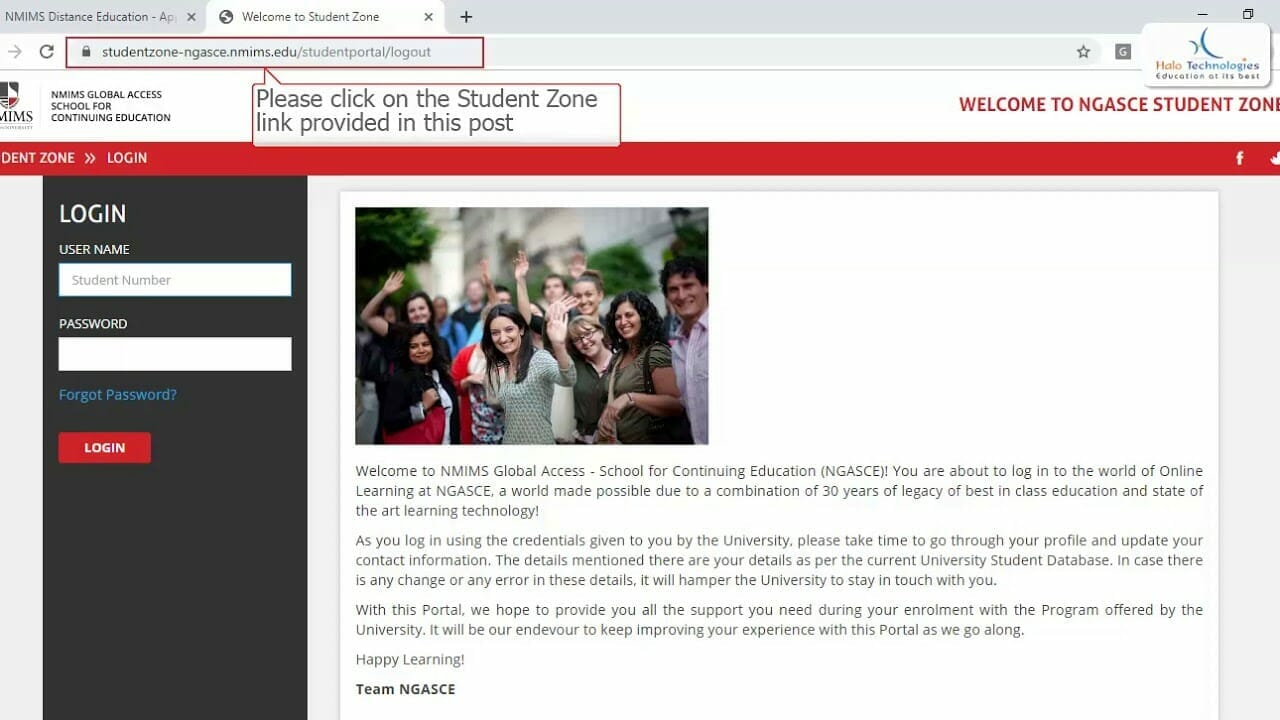
4 Easy Steps to Login to the NMIMS Student Zone

Step 1: Click NMIMS Student Zone Login from Google Chrome or Safari preferably
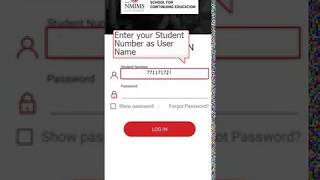
Step 2: Enter your Student Number as User ID
Step 3: Enter your Password

Step 4: Click on Login

Search

2

How to get Student Number and Password for NMIMS Distance?

3

Important Links

4

NMIMS Student Zone – Post Login

5

Troubleshooting

6

NMIMS Distance Education Features

7

NMIMS Global Access School HelpDesk

8

Explainer Videos

Steps from Web Browser
Steps from Mobile App
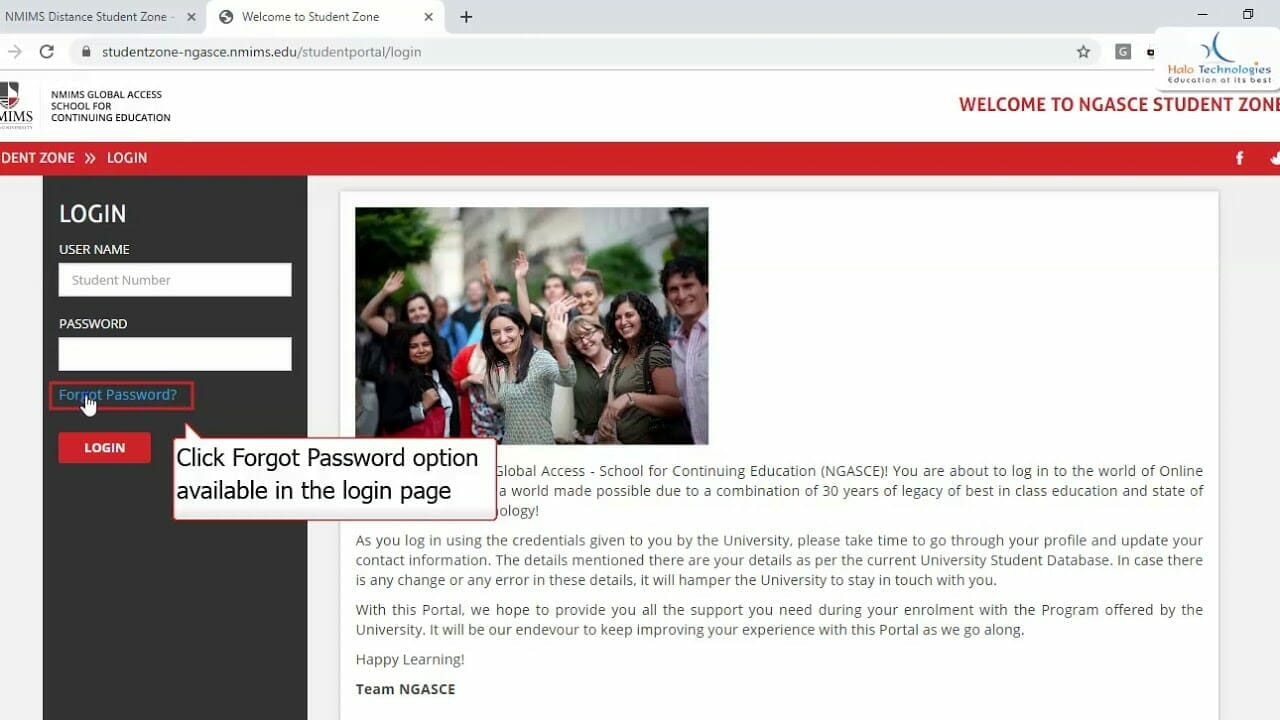
Steps to Reset Password for NMIMS Student Zone

Refer a Friend

Refer a Friend and earn Rewards. Call us or fill the form at www.halo.co.in/refer to refer your Friends and Colleagues.

Call Us

8080 500 400

WhatsApp Us

8080 500 400

Disclaimer

The Content Included In This Website Has Been Compiled From Emails And Communications From NMIMS Distance Learning And NMIMS Global Access School Of Continuing Education Website. It Is Subject To Change Without Notice. The Rules, Policies, and Announcements Are To Be Checked From NMIMS Global (NGASCE) Which Will Be Final And Binding. We Will Not Be Liable For Any Damages, Including Any Consequential Damages, Of Any Kind That May Result To The User From The Use Of The Website, Or Of Any Of Information And/Or Services Described Herein.

Categories
Alerts

Do’s and Don’ts for NMIMS Distance Learning Exams

Table of Contents

The following post provides comprehensive information on Do’s and Don’ts for NMIMS Distance Learning Exams, pre requisites and how to manage different scenarios beyond candidate’s control.

1

Important Notice

Search

2

Candidate Guide for Exams

3

Important Points to Note

4

Common Queries

A. You have enough time to make necessary arrangements, if you still are finding it difficult to arrange the IT infrastructure required at your home / work place to attempt these Exams; you have the choice to wait. As soon as and only if the Government allows, University will also conduct Center-based Exams in April or June 2021. You can give your Exams during that time.

A. Minimum speed 512 kbps of concurrent speed and ensure that there are no restrictions enabled on the network, which is being used

A. Exams will not be conducted on campus or any of the Authorized Partner Centres

A. Exams will not be conducted on campus or any of the Authorized Partner Centres

A. You have enough time to make necessary arrangements, if you still are finding it difficult to arrange the IT infrastructure required at your home / work place to attempt these Exams; you have the choice to wait. As soon as and only if the Government allows, University will also conduct Center-based Exams in April or June 2021. You can give your Exams during that time.

A. Minimum speed 512 kbps of concurrent speed and ensure that there are no restrictions enabled on the network, which is being used

A. Exams will not be conducted on campus or any of the Authorized Partner Centres

A. Exams will not be conducted on campus or any of the Authorized Partner Centres

A. One has to perform regular checks and 24 hours before every Exam, both for Compatibility and Demo Exam

 A. If you get disconnected at the time of Exam, system logs will be checked, post authorization you will be able to resume your Exam from the same point where it got disconnected but only when there is time left in the Exam and disconnection duration is not more than 20 minutes. If the duration of disconnection is more than 20 minutes, such situations will be managed real-time on the day of Exam by Mettl (+918047190917, mettl-support@mercer.com) and University (18001025136, ngasce@nmims.edu). In any situation, DO NOT CLOSE THE BROWSER.

We do not recommend as the network is not stable and also mobile device is not allowed during the Exam. Use only Wired or Wireless internet connection.

Yes if it fulfills the required bandwidth requirement

Exam links will be made available on Student portal, step by step instructions with screenshots will be made available for ease of access 

A. One has to perform regular checks and 24 hours before every Exam, both for Compatibility and Demo Exam

 A. If you get disconnected at the time of Exam, system logs will be checked, post authorization you will be able to resume your Exam from the same point where it got disconnected but only when there is time left in the Exam and disconnection duration is not more than 20 minutes. If the duration of disconnection is more than 20 minutes, such situations will be managed real-time on the day of Exam by Mettl (+918047190917, mettl-support@mercer.com) and University (18001025136, ngasce@nmims.edu). In any situation, DO NOT CLOSE THE BROWSER.

A. Since the Exams are completely online this time, location does not matter. Just note that the Exams are on Indian Standard Time and then go ahead with the Exam Registration. Also do check for the compatibility of the Exams in your region from the link that will be sent to you.

Yes if it fulfills the required bandwidth requirement

Exam links will be made available on Student portal, step by step instructions with screenshots will be made available for ease of access 

5

Checklist before the exam:

6

Checklist- on the day of exam:

7

Below scenarios will be checked and solution provided on case to case basis:

Refer a Friend

Refer a Friend and earn Rewards. Call us or fill the form at www.halo.co.in/refer to refer your Friends and Colleagues.

Call Us

8080 500 400

WhatsApp Us

8080 500 400

Disclaimer

The Content Included In This Website Has Been Compiled From Emails And Communications From NMIMS Distance Learning And NMIMS Global Access School Of Continuing Education Website. It Is Subject To Change Without Notice. The Rules, Policies, and Announcements Are To Be Checked From NMIMS Global (NGASCE) Which Will Be Final And Binding. We Will Not Be Liable For Any Damages, Including Any Consequential Damages, Of Any Kind That May Result To The User From The Use Of The Website, Or Of Any Of Information And/Or Services Described Herein.

Categories
Alerts

Lecture Notification – July 2022 Academic Cycle

Table of Contents

1

Important Notice

Search

It will show in your Academic Calendar one day in advance only.

BBA and BCOM Semester 1 (Batch 1 – Slow Track – Weekday)

Please See: In case of Holiday / Cancellation of the sessions, the said sessions will be adjusted in the evening slot 7.30 PM on Weekday (Monday to Saturday)
Note: Employability Skills Session will be held on Sundays.

MBA Distance and Diploma Semester 1 (Track 1 – Slow Track – Weekend)

MBA Distance and Diploma Semester 1 (Track 2 – Slow Track – Weekday)

MBA Distance and Diploma Semester 1 (Track 3 – Slow Track – Weekend)

MBA Distance and Diploma Semester 1 (Track 4 – Fast Track – Weekend)

MBA Distance and Diploma Semester 1 (Track 5 – Fast Track – All Week)

PG Diploma and MBA Distance Semester 2 (Weekday)

Please See: In case of shortfall of Slots / Holiday / Cancellation, the sessions will be conducted on Saturday / Sunday

PG Diploma and MBA Distance Semester 2 (Weekend)

PG Diploma and Distance MBA Semester 2 (Fast Track – All Week)

PG Diploma Semesters 3 and 4 and Diploma Semester 2 (Weekend Only)

Please See: In case of shortfall of Slots / Holiday / Cancellation, the sessions will be conducted on the remaining weekdays
Note: Some programs may have 3 sessions on Saturdays or Sundays for common Courses

MSc. Applied Finance Term 1 (Weekday Only)

Please See: In case of shortfall of Slots / Holiday / Cancellation, the sessions will be conducted on Saturday / Sunday

MSc. Applied Finance Terms 2, 3 and 4 (Weekday Only)

Please See: In case of shortfall of Slots / Holiday / Cancellation, the sessions will be conducted on Saturday / Sunday

PDWM (Wealth Management) Term 1 (Weekend Only)

PDWM (Wealth Management) Term 2 (Weekend Only)

Certificate Courses (Weekend Only)

Please See: In case of shortfall of Slots / Holiday / Cancellation, the sessions will be conducted on the remaining Weekdays
Certificate Course in Business Management Schedule is same as MBA Distance Semester 1

Assignments Preparation Session for Semesters 1 to 4 All Courses – October 2022 (Date yet to be decided)

Project Preparation Session for Semester 4 of PG Diploma – October 2022 (Date yet to be decided)

3

Special Note for MBA Distance and Diploma Semester 1 Students:

4

Steps to watch Live Lectures online, both on PC as well as Mobile Browser / NMIMS App:

Please see that:

Please mention your Student Number (SAP ID) in all communication.

Refer a Friend

Refer a Friend and earn Rewards. Call us or fill the form at www.halo.co.in/refer to refer your Friends and Colleagues.

Call Us

8080 500 400

WhatsApp Us

8080 500 400

Disclaimer

The Content Included In This Website Has Been Compiled From Emails And Communications From NMIMS Distance Learning And NMIMS Global Access School Of Continuing Education Website. It Is Subject To Change Without Notice. The Rules, Policies, and Announcements Are To Be Checked From NMIMS Global (NGASCE) Which Will Be Final And Binding. We Will Not Be Liable For Any Damages, Including Any Consequential Damages, Of Any Kind That May Result To The User From The Use Of The Website, Or Of Any Of Information And/Or Services Described Herein.

Categories
Alerts

NMIMS June 2022 Term End Exams Registration

Table of Contents

1

Important Notice

2

Important Points to Note regarding: NMIMS June 2022 Term End Exams Registration

Search

3

Details of NMIMS June 2022 Exams

4

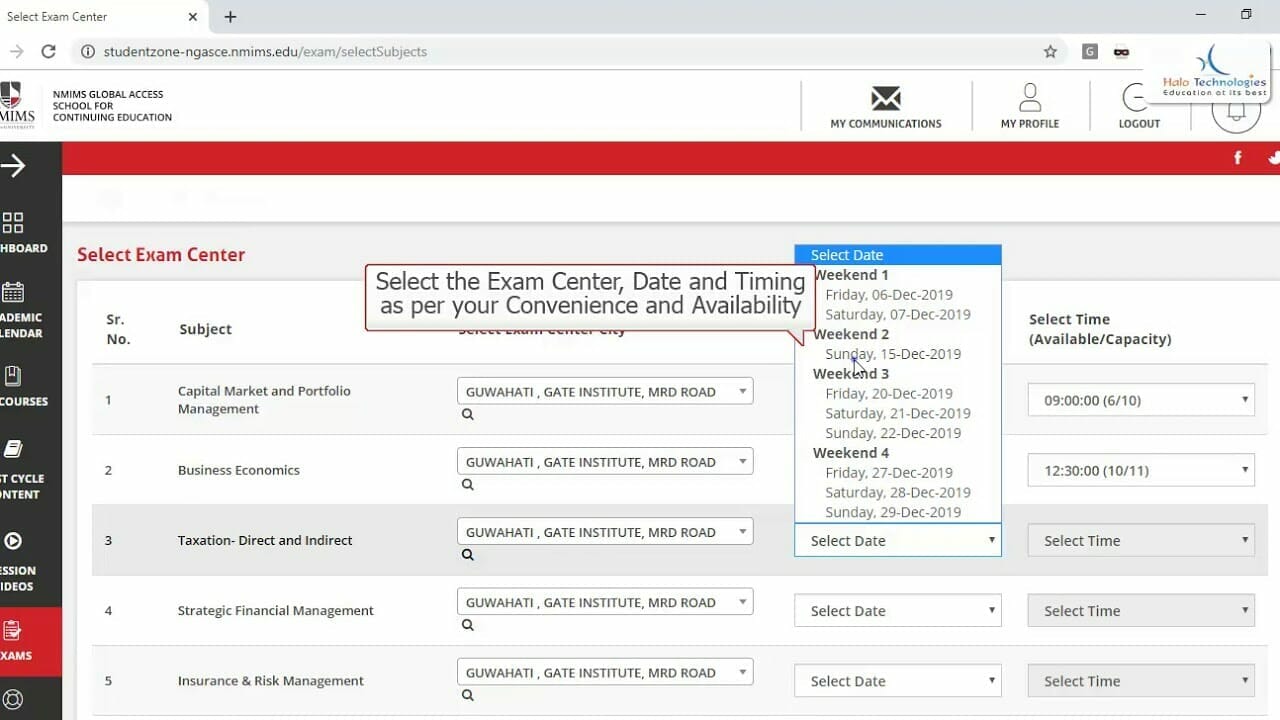
Change Exam Center or Date or Time Slot

5

Examination Fee

6

Prerequisites for Exams

7

Regarding Exams Registration

8

Exams Interface

9

Compatibility Test

10

Common Queries

A. You have time to make arrangements for the same. If you cannot, you will not be able to give NMIMS June 2022 Examinations. You can try for September 2022 Examinations in that case.

A. No, the Exams are completely online and you need to give the Exams only from your place. You have to make sure to have a Desktop or Laptop, Minimum 2 MBPS Internet, Webcam, Well Lit Room with no one around.

Lorem ipsum dolor sit amet, consectetur adipiscing elit. Ut elit tellus, luctus nec ullamcorper mattis, pulvinar dapibus leo.

A. You have time to make arrangements for the same. If you cannot, you will not be able to give NMIMS June 2022 Examinations. You can try for September 2022 Examinations in that case.

A. No, the Exams are completely online and you need to give the Exams only from your place. You have to make sure to have a Desktop or Laptop, Minimum 2 MBPS Internet, Webcam, Well Lit Room with no one around.

Lorem ipsum dolor sit amet, consectetur adipiscing elit. Ut elit tellus, luctus nec ullamcorper mattis, pulvinar dapibus leo.

A. You will be allowed to continue from where you left as soon as you resume. But it will be monitored very closely for unfair means. This decision lies in the hands of University and you may not be allowed to continue. So make sure you fulfill all the criteria for Examinations.

A. Compatibility test is where a link will be sent to you. You have to just follow the steps which will check if you are on PC, and you have a good internet connection, and that you are not behind a firewall, and you have a working webcam and that the room is well lit to see the candidate properly. You have to repeat this test 24 hours before your every Exams to ensure that you do not face any issue in Exam.

A. Since the Exams are completely online this time, location does not matter. Just note that the Exams are on Indian Standard Time and then go ahead with the Exam Registration. Also do check for the compatibility of the Exams in your region from the link that will be sent to you.

A. You will be allowed to continue from where you left as soon as you resume. But it will be monitored very closely for unfair means. This decision lies in the hands of University and you may not be allowed to continue. So make sure you fulfill all the criteria for Examinations.

A. Compatibility test is where a link will be sent to you. You have to just follow the steps which will check if you are on PC, and you have a good internet connection, and that you are not behind a firewall, and you have a working webcam and that the room is well lit to see the candidate properly. You have to repeat this test 24 hours before your every Exams to ensure that you do not face any issue in Exam.

A. Since the Exams are completely online this time, location does not matter. Just note that the Exams are on Indian Standard Time and then go ahead with the Exam Registration. Also do check for the compatibility of the Exams in your region from the link that will be sent to you.

11

Explainer Videos

Steps for Exam Registration from Web Browser

Refer a Friend

Refer a Friend and earn Rewards. Call us or fill the form at www.halo.co.in/refer to refer your Friends and Colleagues.

Call Us

8080 500 400

WhatsApp Us

8080 500 400

Disclaimer

The Content Included In This Website Has Been Compiled From Emails And Communications From NMIMS Distance Learning And NMIMS Global Access School Of Continuing Education Website. It Is Subject To Change Without Notice. The Rules, Policies, and Announcements Are To Be Checked From NMIMS Global (NGASCE) Which Will Be Final And Binding. We Will Not Be Liable For Any Damages, Including Any Consequential Damages, Of Any Kind That May Result To The User From The Use Of The Website, Or Of Any Of Information And/Or Services Described Herein.